
The Elegoo Mars uses Chitubox as its primary slicing software. Chitubox is the default slicer for almost all Mars‑series resin printers and is used to add supports, slice the STL file into layers and export the correct print parameters for the machine. Even the free version includes all essential tools needed to prepare reliable resin 3D‑prints.
Other slicers such as Lychee Slicer, Photon Workshop and PrusaSlicer can work with some resin printers, but they are not commonly used with the Elegoo Mars series.
Using Chitubox with the Elegoo Mars
To prepare a print job for the Elegoo Mars, download the latest version of Chitubox. After installation, add your printer profile and select the correct resin settings. You can manually enter the recommended Liqcreate parameters or import a complete settings file.
Once the printer and resin are selected, support your model, slice the file and export it to the Elegoo Mars.
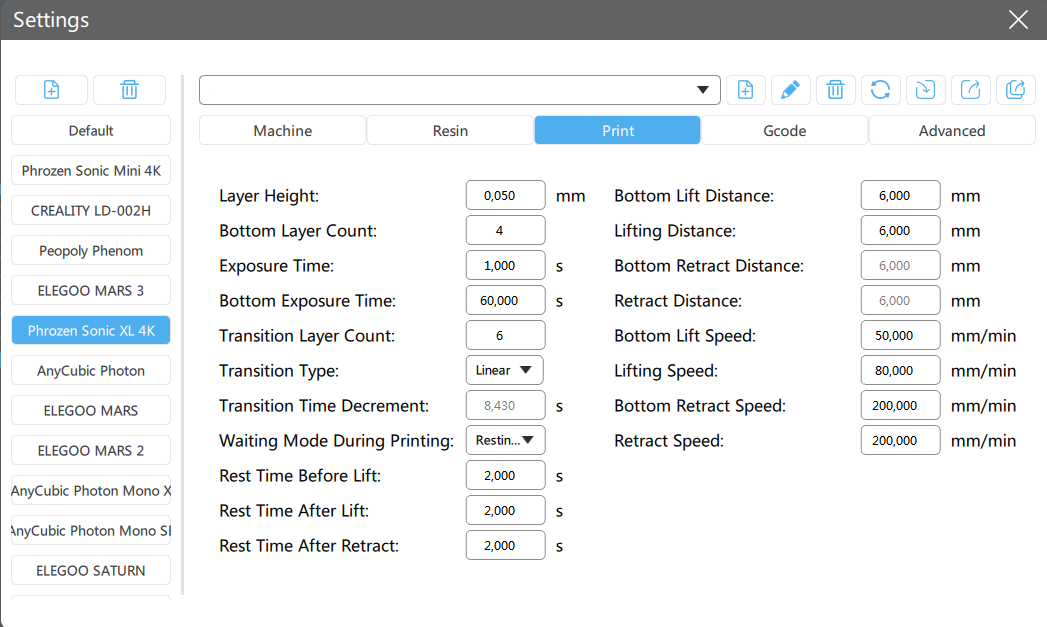
Image: Example of the 3D‑printing parameters in Chitubox.
How to add the Elegoo Mars in Chitubox
Adding your Elegoo Mars printer profile is straightforward:
- Open Settings in Chitubox
- Click the + icon in the top‑left corner
- Select Elegoo → Mars / Mars Pro / Mars 2 / Mars 3 / Mars 4, depending on your model
- Confirm the default machine parameters
Most machine‑level settings are correct out of the box. For general printing, you only need to adjust the Print section. For high‑accuracy applications, you can fine‑tune advanced parameters such as lift speed, retract speed and anti‑aliasing.
How to change settings in Chitubox
Chitubox allows full control over exposure, lift mechanics and support behavior. Before adjusting parameters, ensure that:
- – Chitubox is updated to the latest version
- – The correct Elegoo Mars profile is selected
- – The correct resin is chosen
Key areas in the Print section include:
- – Layer height
- – Normal exposure time
- – Bottom exposure time
- – Lift speed and retract speed
- – Wait time before lift
For detailed explanations of each setting, refer to the Chitubox settings documentation or the support guidelines for resin‑specific parameters.
Help with Chitubox settings
If you need assistance configuring Chitubox for Liqcreate resins, contact our engineering team at info@liqcreate.com. We can help with exposure tuning, support optimization and workflow troubleshooting for all Elegoo Mars printers.
Support
Do you need any help with 3D printing our SLA, DLP or LCD resins? We can help you! Just look for the question you have below. If you can’t find it, let us know by contacting us!
